How to Attach and Detach Database on SQL Server

This is a simple way on how to Attach and Detach Database on your SQL Server,
to work with it just follow this few step's:

here where to Detach your Database, just right-click on your database then click
Task, and hit Detach and your done like shown on the image below


Continue Reading with Borgy's Blog »
These icons link to social bookmarking sites where readers can share and discover new web pages.
  • Digg
  • Sphinn
  • del.icio.us
  • Facebook
  • Mixx
  • Google
  • Furl
  • Reddit
  • Spurl
  • StumbleUpon
  • Technorati

Cannot Insert Duplicate Key in Object 'dbo.BO'


Are you encounter this kind of error?, if you, you are in the right place at the right time, this
error says Violation of Primary key, obviously the problem is on my database, that
also indicated on the error dialog, 'dbo.BO' is my database name on my SQL Server,
so the main problem is when i'm trying to INSERT a duplicate value on a TABLE which

Continue Reading with Borgy's Blog »
These icons link to social bookmarking sites where readers can share and discover new web pages.
  • Digg
  • Sphinn
  • del.icio.us
  • Facebook
  • Mixx
  • Google
  • Furl
  • Reddit
  • Spurl
  • StumbleUpon
  • Technorati

How to Call Sql Server Stored Procedure in VB6

Hello Guys, At this time i will show to you on how to execute or call a stored procedure of
SQL Sever, here we go>>>>>>>>>>

Make sure that your Database Connection and Command, like shown at code below


Public MrCmd As ADODB.Command 'just put it on amodule
Public Conn As ADODB.Connection

i declare MrCmd as my ADODB.Command and Conn As ADODB.Connection as
Public for me to access or use it every-time i want, so you can write it like this

Set MrCmd = New ADODB.Command ' you must set MrCmd  as New 
                                                               ADODB.Command
MrCmd.ActiveConnection = Conn          ' this were your connection is being set
MrCmd.CommandType = adCmdStoredProc 'since we are dealing with stored procedure
                                                                 'let set the command type = adCmdStoredProc

MrCmd.CommandText = "Get_Products" ' this is your Stored Procedure

MrCmd.Execute 'execute your stored procedure
MrCmd.ActiveConnection = Nothing 'set your connection  close

Hope this will help

Happy Coding
The Hardest Thing to Do is to Do Nothing ^_^
Continue Reading with Borgy's Blog »
These icons link to social bookmarking sites where readers can share and discover new web pages.
  • Digg
  • Sphinn
  • del.icio.us
  • Facebook
  • Mixx
  • Google
  • Furl
  • Reddit
  • Spurl
  • StumbleUpon
  • Technorati

Syntax Error or Access Violation( Run-time error '-2147217900 (80040e14)')

If you are getting trouble on this kind of error prompting
 Run-time error '-2147217900 (80040e14)' Syntax Error or Access Violation like
shown at the image below:

                                Figure 1.0


Continue Reading with Borgy's Blog »
These icons link to social bookmarking sites where readers can share and discover new web pages.
  • Digg
  • Sphinn
  • del.icio.us
  • Facebook
  • Mixx
  • Google
  • Furl
  • Reddit
  • Spurl
  • StumbleUpon
  • Technorati

Could Not Open a Connection to SQL Server

If you encounter this kind of error on your SQL Server while you are attempting to connect
or logging in on your server, getting this error message shown at the image below, the only
reason of this, your Database Engine Service Status is Stopped


you are in the right place at the right time, all you have to do is go to SQL Server Surface 
Area Configuration for you fixed this error, to send you up in SQL Server Configuration
just follow the instruction image below

Continue Reading with Borgy's Blog »
These icons link to social bookmarking sites where readers can share and discover new web pages.
  • Digg
  • Sphinn
  • del.icio.us
  • Facebook
  • Mixx
  • Google
  • Furl
  • Reddit
  • Spurl
  • StumbleUpon
  • Technorati

How to Convert MS Access Database to SQL Server Database

Hello guys at this time i will show to you on how to convert your MS Access Database to
SQL Server Database, to do this, just follow those few steps below.


on your MS Access database, go to Database Tools, go to Move Data tab, then click
SQL Server


then the Up-sizing wizard will prompt, allowing you to use an option, at this time since
i am not using Existing Database, so i select Create new Database, then Click Next
button,

Continue Reading with Borgy's Blog »
These icons link to social bookmarking sites where readers can share and discover new web pages.
  • Digg
  • Sphinn
  • del.icio.us
  • Facebook
  • Mixx
  • Google
  • Furl
  • Reddit
  • Spurl
  • StumbleUpon
  • Technorati

How to Create a New User in SQL Server 2005

Are you getting bored about your Sql Server User Log-in?, at this time i will demonstrate to
you on how to add a new User Log-In on your Sql Server,by the way the default user log-in
on the Sql Server Authentication mode is "sa", so we want to do is try something new
so to do this, just follow those few steps below and those will saved your day:

1.) Go to Security tab, just look at the hierarchical folder at the Left side pane of your Sql 
Server like shown on the image below:


Continue Reading with Borgy's Blog »
These icons link to social bookmarking sites where readers can share and discover new web pages.
  • Digg
  • Sphinn
  • del.icio.us
  • Facebook
  • Mixx
  • Google
  • Furl
  • Reddit
  • Spurl
  • StumbleUpon
  • Technorati

Run-time Error '-21472117900(80040e14)'

" [Microsoft][OBDC SQL Server Driver][SQL Server] the normal parameter "@Status"
was not declared as an an OUTPUT parameter,but the actual parameter passed
in requested output "


This error will get you in trouble????????????????? at my own experience this error comes
out when i call a stored procedure on my SQL Server database and after compiling it this
error will appear saying those message,i double check my code then traced where  this error
came out,so my situation is i declare a  parameter on my stored procedure where does not 
declare its output parameter,the problem goes here,

i declare a parameter @Status on my stored procedure but the sad thing is i forgot the value
of this where  supposedly look like this,

MyCmd.Parameters.Append MyCmd.Create Parameter("SPLAppPos", adVarChar, 
adParamInput, 50,"Active")

so its better to declare all the parameters and declare their corresponding value to avoid
this kind of typo error

Happy Coding ^_^
The Hardest Thing to Do is to Do Nothing ^_^
Continue Reading with Borgy's Blog »
These icons link to social bookmarking sites where readers can share and discover new web pages.
  • Digg
  • Sphinn
  • del.icio.us
  • Facebook
  • Mixx
  • Google
  • Furl
  • Reddit
  • Spurl
  • StumbleUpon
  • Technorati

Codes-47: Msg 102, Level 15, State 1, Procedure Holidays, Line 19 Incorrect syntax near '@App_By'.

"Msg 102, Level 15, State 1, Procedure Holidays, Line 19 Incorrect syntax near '@App_By'."


This Error come out when i wrote a simple stored procedure at my

Continue Reading with Borgy's Blog »
These icons link to social bookmarking sites where readers can share and discover new web pages.
  • Digg
  • Sphinn
  • del.icio.us
  • Facebook
  • Mixx
  • Google
  • Furl
  • Reddit
  • Spurl
  • StumbleUpon
  • Technorati

Run-Time Error '3421'

"Application uses a value of the wrong type for the current operation"

This error will appear on your current environment specially if you are working Sql Server 
stored procedure and call it via VB6. To fixed this problem, you can double check the Data 
Type fields on your database and make it sure that you assign it on their respective data types
and also on your Stored Procedure, this is a sample,assigning on its corresponding Data Types


As you can see at the image above the data types on each field will exactly fit or accurate on
each column name, and make it sure your stored procedure will set on its corresponding data
types:

Hope this will Help ^_^
The Hardest thing to to is yo Do Nothing ^_^
Continue Reading with Borgy's Blog »
These icons link to social bookmarking sites where readers can share and discover new web pages.
  • Digg
  • Sphinn
  • del.icio.us
  • Facebook
  • Mixx
  • Google
  • Furl
  • Reddit
  • Spurl
  • StumbleUpon
  • Technorati

Run-time ERROR -2147217900(8004e14)

[MICROSOFT][OBDC Sql Server Driver][Sql Server] procedure or function (Get_Emp)
expects parameter  '@empid',which was not supplied

I encounter this error when i call a stored  procedure from my SQL SERVER database,
the cause of this error is when i forgot to declare the parameters of my stored procedure
that supposedly declaring like this:

Mycmd.Parameters.Append _
Mycmd.CreateParameter("EmpID",Advarchar,AdparamInput, _
50,txtid.text)

Note: Get_Emp is my Stored Procedure Name

Happy coding ^_^
The Hardest thing to do is to do Nothing
Continue Reading with Borgy's Blog »
These icons link to social bookmarking sites where readers can share and discover new web pages.
  • Digg
  • Sphinn
  • del.icio.us
  • Facebook
  • Mixx
  • Google
  • Furl
  • Reddit
  • Spurl
  • StumbleUpon
  • Technorati

1.) First you must click the Project Tab shown in the figure below,Then Click Add Data 
Environment


2.) Connection Environment will Appear


3.) To connect to Data Source Name,just right-click the connection,then click properties
like shown on the image below


Continue Reading with Borgy's Blog »
These icons link to social bookmarking sites where readers can share and discover new web pages.
  • Digg
  • Sphinn
  • del.icio.us
  • Facebook
  • Mixx
  • Google
  • Furl
  • Reddit
  • Spurl
  • StumbleUpon
  • Technorati

1.) First you must click the Project Tab shown in the figure below,Then Click Add Data
Environment


2.) Connection Environment will Appear


3.) To connect to Data Source Name,just right-click the connection,then click properties like
shown on the image below


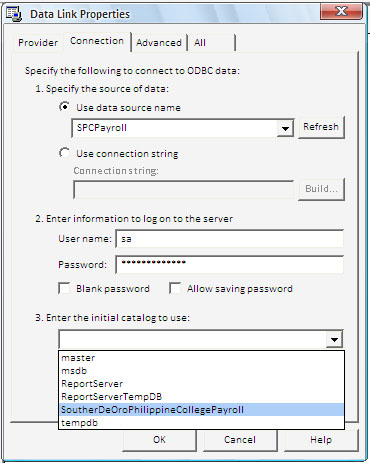
4.) Data Link Properties dialog will appear and select Microsoft OLEDB Provider For 
OBDC Drivers,then Click Next


5.) From the Connection Tab,select the button Use data source name, then press the drop
down button of the combo box then select your DSN file listed,like what i did


6.) then at User Name:(enter the username of your server) password:(enter your server
password) then at the Enter Initial catalog to use: just select your listed  server database 


Continue Reading with Borgy's Blog »
These icons link to social bookmarking sites where readers can share and discover new web pages.
  • Digg
  • Sphinn
  • del.icio.us
  • Facebook
  • Mixx
  • Google
  • Furl
  • Reddit
  • Spurl
  • StumbleUpon
  • Technorati

How to Create Table on SQL Server

Here the Following steps on how to create Table on your
SQL Server 2005

On your Database that you Created just click the cross
box to view it on a hierarchical form shown on  the image
below, by creating database just follow this link
How to Create a Database on SQL Server 2005,
then on the Tables just simply right-click  and press
New Table


After pressing New Tables this will prompt to you or also
known as the Design View, Insert your Column Name,
and Specified the Data Types,and Allowing Nulls if you
want to not Duplicate the Value of the data or the value of
ID_Num to avoid Data Redundancy just unchecked the
box,or you want to duplicate it just leave it with checked


Then Click Save and prompting the Choose Name Dialog
so choose your table name at this time i type Employees


Then you can see your table under  Tables,just click the cross box
it will show the dbo.Employees,it will show also at the summary at the
right pane of object explorer


or we can also create table via SQL Query by doing this
just press New Query Tab, then enter this following code

--this will create also the Employees table
CREATE TABLE Employees (

     ID_Num int NOT NULL,
     First_Name varchar (25),
     Last_Name varchar(50),
    Middle_Name varchar(50),

)


Good Luck (^_^)
Continue Reading with Borgy's Blog »
These icons link to social bookmarking sites where readers can share and discover new web pages.
  • Digg
  • Sphinn
  • del.icio.us
  • Facebook
  • Mixx
  • Google
  • Furl
  • Reddit
  • Spurl
  • StumbleUpon
  • Technorati

How to Create Database on SQL Server

this is the basic steps on how to create your own database on
your SQL Server 2005

At the Object Explorer window just right-click the database
then click New Database like shown on the image below.


After pressing the New Database this will prompt the
New DatabaseDialog window, at obviously your
database name

Database Name: (Type your Database Name)
Owner: (set default)
at this time let filled up with Payroll database
then press the OK button not the Add Button


Then after the Payroll database will added on your server and
it will show also on the summary window show at the right


by Creating a Table just Follow this link below
How to Create Table on SQL Server

Good Luck!!!!!
Continue Reading with Borgy's Blog »
These icons link to social bookmarking sites where readers can share and discover new web pages.
  • Digg
  • Sphinn
  • del.icio.us
  • Facebook
  • Mixx
  • Google
  • Furl
  • Reddit
  • Spurl
  • StumbleUpon
  • Technorati

How to Create a Stored Procedure in SQL Server

Hello guys this is the basic way on how to simply Create a Stored Procedure in Sql Server
2005 just follow the Steps that shown on the Image below


Click Database then


Continue Reading with Borgy's Blog »
These icons link to social bookmarking sites where readers can share and discover new web pages.
  • Digg
  • Sphinn
  • del.icio.us
  • Facebook
  • Mixx
  • Google
  • Furl
  • Reddit
  • Spurl
  • StumbleUpon
  • Technorati

How to Create a System DSN of SQL Server

This is a few steps on how to Create a System DSN of SQL Server


Locate your Control Panel then Click Administrative Tools


Then Click Data Source (OBDC)


Click the System DSN Tab then click ADD button


hen Locate for the SQL Driver named
SQL Server then click Finish


then Create a New Data Source to SQL Server Dialog will prompt
under Name:(give the name of your connection)
Description:(give the name of your connection)
Server: (browse your active server) then press NEXT


at this time we will connect on Windows authentication for

Continue Reading with Borgy's Blog »
These icons link to social bookmarking sites where readers can share and discover new web pages.
  • Digg
  • Sphinn
  • del.icio.us
  • Facebook
  • Mixx
  • Google
  • Furl
  • Reddit
  • Spurl
  • StumbleUpon
  • Technorati

Copyright @ Codes-47.Blogspot.Com. Powered by Blogger.